
Everything You Need to Teach and Practice Clinical Skills
From realistic AI patient encounters to rubric-aligned assessment and LMS integration — Clintuition gives learners, educators, and programs one place to practice, review, and improve.
Built for Learners and Educators
Two flows. Same platform. Whether you're practicing on your own or running a program, here's how it works.
Practice in three steps
Choose a case (or a blind case)
Browse cases assigned to you, pick from the public library, or run a blind case where the diagnosis is hidden from you.
Talk to the AI patient
Ask questions, perform exams, request orders, and reason through what's wrong — exactly how a real encounter unfolds.
Get rubric-aligned feedback
Every encounter generates an AI narrative assessment with an overall score, specific gaps, and rubric-aligned feedback.
Author and assess in five steps
Author a case
Use Patient Studio to co-author cases with an AI co-author, or build manually. Run blind builds for OSCE and residency programs.
Attach a rubric
Use Rubric Studio to draft rubrics conversationally, or build manually. Attach any rubric to any case.
Assign to a cohort or LMS
Assign to groups, deep-link from Canvas or Moodle, and set instructor-review requirements before learners see results.
Review encounters
Read transcripts, see AI narrative assessments, add comments, and require sign-off before learners see their scores.
Grade passback
LTI grade passback is in pilot with select Canvas and Moodle programs.
Built for Medical Education — Not Retrofitted
Every feature is purpose-built for clinical simulation, structured assessment, and program-level management. No workarounds needed.
AI Patient Simulations
Every encounter is a realistic clinical conversation. AI patients respond based on their medical history, symptoms, and clinical context — not a script. Learners practice history-taking, differential diagnosis, and clinical reasoning in a safe, repeatable environment.
- Dynamic responses shaped by clinical context
- Covers multiple specialties and case complexities
- Practice anytime — no scheduling or standardized patients needed
Rubric-Aligned Assessment
Forget vague pass/fail scores. Every encounter is evaluated across structured clinical domains with actionable, specific feedback that maps to the competencies learners need to develop.
- Domain-level scoring (history, physical exam, reasoning, and more)
- Automated assessment generation after each encounter
- Designed for OSCE preparation and competency tracking
Group-Based Learning
Organize learners into groups and cohorts. Assign patient cases, track progress, review encounters, and deliver feedback — whether you're managing a small seminar or an entire program.
- Create groups with custom patient case assignments
- Instructor review and feedback workflows
- Role-based access for learners, educators, and admins
LMS Integration (LTI 1.3)
Launch encounters directly from Canvas, Moodle, or any LTI 1.3-compatible learning management system — learners sign in once, no extra logins or tab-switching.
- One-click launch from your existing LMS
- Deep linking for specific patient cases
- LTI grade passback in pilot with select Canvas and Moodle programs
AI Patient Studio
Author cases by talking to an AI co-author. Describe the scenario, refine the history and exam in conversation, and publish when ready — or hand off to the manual editor at any point for full control.
- Conversational case authoring — describe the scenario, refine in dialogue
- Manual editor with full control over every clinical field
- Blind-case mode — the AI writes the case with the diagnosis hidden from author and learners alike
- Four visibility levels (Public, Unlisted, Restricted, Inactive) and version history so edits never overwrite previous work
AI Rubric Studio
Design assessment rubrics in conversation, not spreadsheets. Tell Rubric Studio what you're assessing — history-taking, physical exam technique, clinical reasoning — and it drafts the domains, items, and scoring criteria with you. Edit anything by hand whenever you want.
- Conversational rubric authoring with an AI co-author
- Manual editor for full control over domains, items, and scoring
- Attach any rubric to any patient case
- Rubric versioning so edits never break existing assessments
Blind Encounter Mode
Practice real diagnostic reasoning — not flashcards. Pick a case, hide the diagnosis, and figure out what's wrong by talking to the AI patient — exactly how it works in real life.
- The diagnosis is hidden from you, not from the AI patient
- Full encounter workflow — interview, exams, orders, chart
- The same rubric-aligned narrative assessment after every blind run
Real-Time Activity Notifications
Stay informed without refreshing. Learners and instructors receive live updates as encounters complete, assessments are generated, and group activity unfolds.
- Instant notifications for encounter and assessment events
- Activity feed for group-level updates
- No polling — updates arrive the moment they happen
What Clintuition Looks Like in Practice
Real screenshots from the platform — no stock images, no mockups.
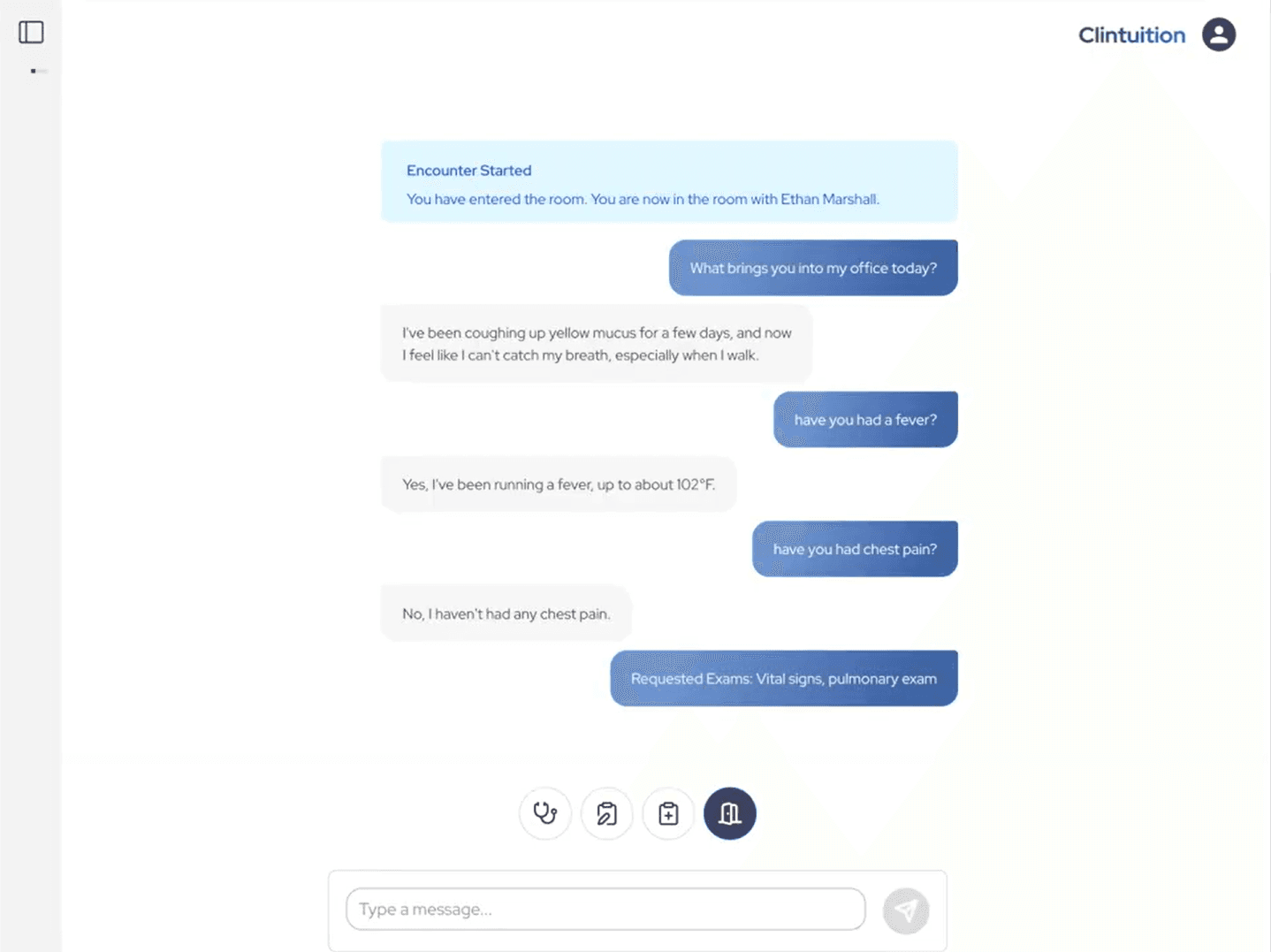
Interactive Patient Encounters
Engage in realistic clinical conversations with AI patients. Ask questions, request exams, and practice your clinical reasoning in real time.
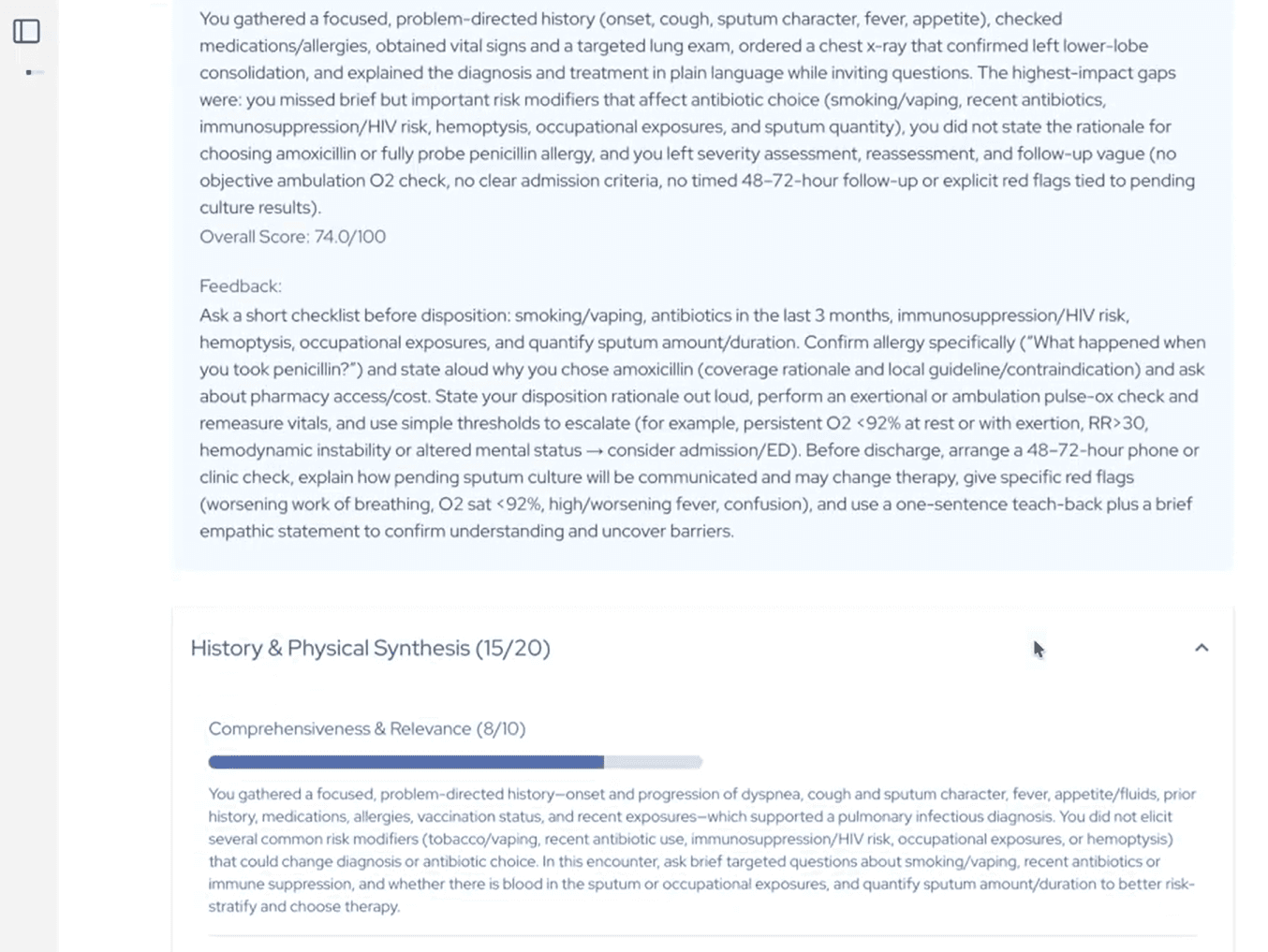
Detailed Performance Feedback
Receive rubric-aligned scoring and actionable feedback on your history-taking, physical exam, and clinical decision-making skills.
Designed for Everyone in Clinical Education
Learners
Practice patient encounters on your own schedule. Get immediate, structured feedback that shows you exactly where to improve — no waiting for standardized patient availability or instructor review.
Educators & Faculty
Assign cases to your students, review their encounters, and provide feedback through built-in workflows. Rubric-aligned assessments give you data, not guesswork, on learner performance.
Programs & Institutions
Manage cohorts at scale with group-based tools, LMS integration, and role-based access. Clintuition fits into your existing infrastructure — launch directly from Canvas or Moodle.
Ready to Transform Your Clinical Training?
Create your free account and run your first AI patient encounter in minutes. No credit card required — free through December 2026.